Tuesday, October 10, 2006

Clustering web applications on Tomcat - Part 4

<- Part 3


Maintenance and Reliability

Tomcat:

Given that Tomcat shares the clustered state among all participating nodes, it is not unexpected that this architecture introduces bottlenecks at some point in the cluster. The overall throughput of the system drops as a function of the number of nodes added into the cluster. From the operations point of view, this can be a considerable overhead as IT cannot add capacity on demand.

Tomcat also supports a couple of persistent mechanisms which write the sessions on to disk or into a Database through JDBC. The caveat here is that the control over when these sessions are written to the persistent store is not very robust, and hence there can be some data loss and/or data integrity can be compromised.

Terracotta:

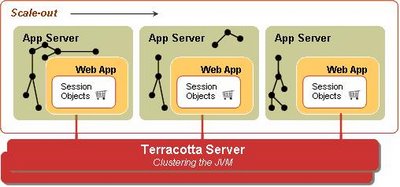
Terracotta functions as a dedicated state server and plugs into the JVM memory model to provide a highly transparent and efficient clustering implementation to resolve typical bottlenecks, as illustrated by the following diagram.
The Terracotta solution provides a persistent mode, where multiple instances of the Terracotta server share data through a shared disk space (e.g. SAN). This makes the solution more robust as it eliminates any single point of failure in the system.


A very interesting and powerful side-effect of the Terracotta solution is that the application is no longer constrained by the JVM heap size and has "virtual" memory available on demand. Typical 32 bit architectures allocate a maximum of 1.5-2 GB (approx.) heap to the JVM. If your application grows beyond this limit, the JVM will spend most of its time garbage collecting (very high performance hit) and will eventually throw an OOME (OutOfMemoryException). In the Terracotta world, the LRU (least recently used) objects are flushed from the local (client) cache to the Terracotta server, and the LRU objects on the server are flushed onto disk. Terracotta gives you "Network Attached RAM"; no more annoying OOMEs.


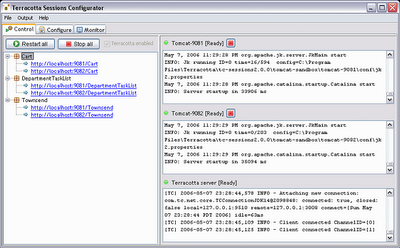
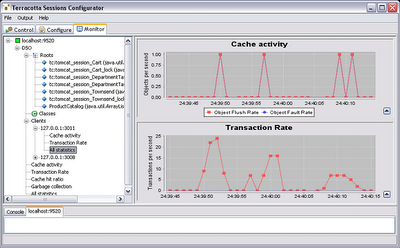
As mentioned before, Terracotta also ships with a very useful Admin Console Tool, which allows you to look at the shared sessions and the objects within the session at run time. From the operations perspective, it allows you to monitor the system cache activity, transaction rate and the cache hit ratio as shown in the following screenshots.

Conclusion

Pairing Tomcat with Terracotta delivers a very unique and powerful linear-scale and high-performance HTTP Session clustering solution. Your existing Tomcat environment becomes very powerful and scalable by introducing Terracotta Sessions into the picture. Terracotta allows you to use clustering as an infrastructure-level service by not introducing any clustering code in your application.

Because of its unique architecture, Terracotta delivers the following benefits:

  • Linear scale-out
  • Significantly reduced TCO
  • High performance
  • No application changes – it is not necessary to write to an API, implement serialization, or call setAttribute().
  • Network efficiency – Without serialization, changes are detected and transmitted at the field level. Replication of data occurs only where necessary.
Terracotta Sessions can be downloaded here.

<- Part 3

Clustering web applications on Tomcat - Part 3

<- Part 2 Part 4 ->

Performance


We performed a benchmarking exercise to highlight the performance characteristics of the two solutions. Our test consisted of the following simulated real world actions:

1. Log in to the application
2. Add several items to the shopping cart (The JPetStore application stores shopping cart in session)
3. Modify the quantity of the items in the shopping cart.

To obtain quantifiable results, Step 3 was repeated for 60,000 iterations and the resulting numbers of transactions per second were measured.

Results:

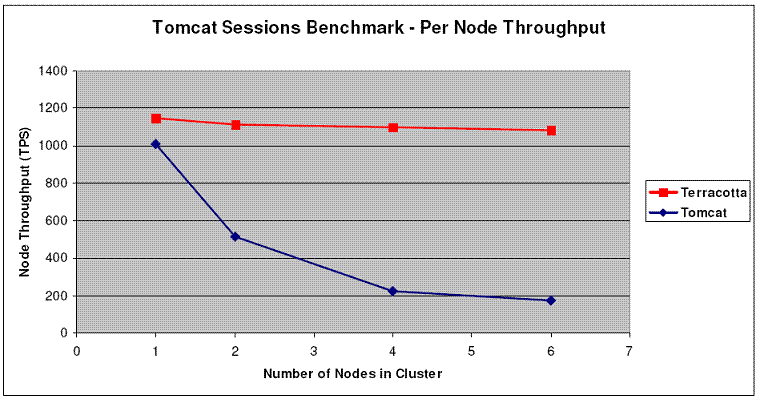
The following graphs show the performance test results for both the Terracotta Sessions and Tomcat Pooled Mode replication clustering solutions. To test linear scalability, the throughput results were obtained for one node in the cluster, not cluster wide.

In the above graph, Tomcat with Terracotta scales linearly as more nodes are added with a flat curve (red curve - no decrease in throughput). Tomcat with its "Pooled Mode Replication" clustering solution, on the other hand, does not scale linearly with a curve that decreases as more nodes are added (blue curve).

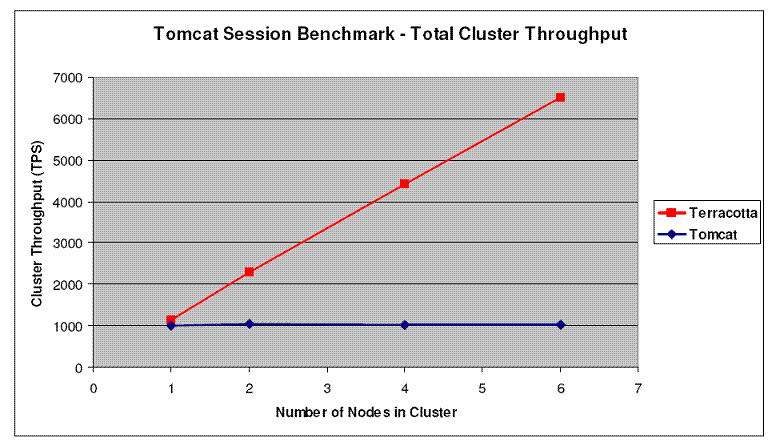
As a result, as is evident in the following graph, the overall system performance increases (Terracotta Sessions + Tomcat - red curve) as against decreasing (Tomcat Clustering - blue curve) when more nodes are added into the cluster.

<- Part 2 Part 4 ->

Clustering web applications on Tomcat - Part 2

<- Part 1 Part 3 ->

Now that we have the background, let's go ahead with the test.

For this test, we used the JPestStore application, which is a widely accepted reference implementation of a typical web application, using various components of the J2EE stack. We used the JPetStore implementation which is bundled with the The Spring Framework (v1.2.8) and can be downloaded here.

Simplicity

Tomcat:

To cluster JPetStore with Tomcat, we had to do the following:
  • All the session attributes and the objects in their reference graph must implement java.io.Serializable
  • Uncomment the Cluster element in server.xml
  • Uncomment the Valve(ReplicationValve) element in server.xml
  • If the Tomcat instances are running on the same machine, make sure the tcpListenPort attribute is unique for each instance.
  • Make sure the web.xml has the element or set at your
  • Make sure that jvmRoute attribute is set at your Engine
  • Make sure that all nodes have the same time and sync with NTP service!
  • Make sure that the loadbalancer is configured for sticky session mode.

In addition, the application had to make an explicit call to setAttribute() on the session to reduce network chattiness.

Terracotta:

With Terracotta Sessions, we were able to cluster the JPetStore application in under a few minutes, thanks to the really helpful configurator tool that is shipped with the product. The entire process involved firing up the configurator tool, importing the JPetStore war file from within the configurator and firing up the server instances. Done.

Terracotta clusters the sessions declaratively, which means we did not make any code changes or implement java.io.Serializable on session attributes. The entire process involves:

  • Declaring the application name in the Terracotta configuration xml file (tc-config.xml).
  • Fire up the Terracotta Server.
  • Make a call to each Tomcat node in the cluster through Terracotta client script.
The configurator tool did all of the above for us. The configurator has another very useful feature called the Admin-Console which allowed us to look at behavior of our clustered application at run time.

<- Part 1 Part 3 ->